

Introduction: The Overwhelm of Modern Projects
Imagine you’re building a treehouse. You’ve got a hammer, nails, wood, and a bucket of paint. You start working, but you quickly realize you can’t paint the roof before you build it. You can’t hang the ladder before the walls are up. You’re faced with a project management puzzle: what’s the right order of operations? Which steps are truly essential to finishing on time?
This puzzle is the daily reality for project managers, whether they’re launching software, constructing a skyscraper, or organizing a global marketing campaign. The tasks are complex, interconnected, and the stakes are high.
The answer to this puzzle is the Critical Path Method (CPM). Think of it as a master key for your project. It gives you the power to:
- Identify the sequence of tasks that must be completed on time.
- See which tasks have a little wiggle room.
- Determine the absolute fastest time your project can be completed.
In this article, you’ll learn what the critical path is in simple terms, how to find it step-by-step, and how modern tools can make the entire process effortless. By the end, you’ll understand why mastering the critical path is the ultimate shortcut to saving time, money, and stress.
What is the Critical Path?
At its core, the critical path is the longest sequence of dependent tasks that determines the total duration of your project.
This sounds a bit paradoxical, but it makes perfect sense. Picture your project as a series of different paths of tasks happening at the same time. The total time it takes to finish the entire project is dictated by the path that takes the longest to complete. Any delay on that specific, longest path will directly push back your project’s final deadline. That’s why it’s “critical”—it’s the one path you absolutely cannot afford to mess up.
On the other hand, tasks that are not on the critical path have something called float (or slack). This is the amount of time a task can be delayed without affecting the project’s overall completion date. Tasks on the critical path have zero float.
How to Find Your Critical Path in 5 Simple Steps
Finding the critical path might seem complex, but it’s a logical, step-by-step process. Let’s use a simple example: making your morning coffee.
Step 1: List all your tasks (Create a WBS)
First, you need to identify every single task required to complete your project. In project management, this is a Work Breakdown Structure (WBS).

Our Coffee Project:

Step 2: Identify dependencies between tasks
Next, figure out which tasks depend on the completion of others.

Our Coffee Project:
- Task C (Scoop coffee) depends on B (Grind beans).
- Task D (Pour water) depends on A (Boil water) and C (Scoop coffee).
- Task E (Add milk) depends on D (Pour water).
Notice that tasks A and B can be done at the same time!
Step 3: Draw a network diagram
Convert your list of tasks and dependencies into a visual flowchart. This helps you see the entire workflow from start to finish.

Step 4: Estimate task duration and perform calculations (Forward & Backward Pass)
Now it’s time for some math. For each task, you’ll calculate four key dates:
- Early Start (ES): The earliest a task can begin.
- Early Finish (EF): The earliest a task can finish.
- Late Start (LS): The latest a task can begin without delaying the project.
- Late Finish (LF): The latest a task can finish without delaying the project.
This is done in two passes:
- Forward Pass (calculating ES and EF): You start from the very first task and move forward. The ES of the first task is 0.
- Formula: EF = ES + Duration
- The ES of the next task is the EF of the previous one (or the highest EF if it depends on multiple tasks).
- Backward Pass (calculating LF and LS): Starting from the project’s final deadline, you work your way backward to determine the latest each task can start and finish without delaying the overall project.
- Formula: LS = LF – Duration
- The LF of the preceding task is the LS of the next one (or the lowest LS if multiple tasks depend on it).
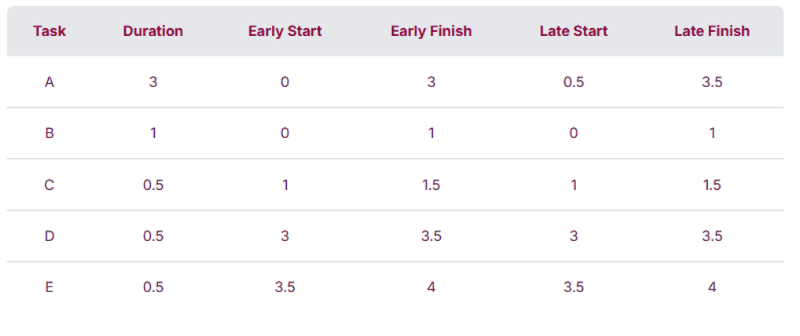

Step 5: Calculate Float (Slack) and Identify the Critical Path
Float is the amount of time a task can be delayed without affecting the project’s final date.
- Formula: Float = LS – ES (or LF – EF)
The critical path is the sequence of tasks where every single task has a float of zero. These are your highest-priority tasks.
Our Coffee Project:
After doing the math, you’ll find that the path B -> C -> D -> E is your critical path. Boiling the water (Task A) has some float; it can take a bit longer and you’ll still be ready by the time the coffee is ground and scooped.


To sum up in simple words:

Why Should You Care? The Real-World Benefits of CPM
So, what’s the point of all this? Knowing your critical path gives you a huge advantage:
- Better Focus: You know exactly which tasks require your full attention.
- Smarter Resource Allocation: You can move people and equipment from tasks with a lot of float to those on the critical path.
- Proactive Risk Management: You can immediately see which potential delays will derail your entire project.
- Clearer Communication: You can easily explain to your team and stakeholders why certain tasks are more important than others.
Want to dive deeper into the official standards? Check out the Project Management Institute (PMI) resources on this topic.
The BigPicture Advantage: From Theory to Practice
Manual CPM calculations are great for a coffee project. But in the real world, with hundreds of tasks and complex interdependencies, it’s an impossible, error-prone task.
This is where project management tools like BigPicture come in. Instead of drawing diagrams on a whiteboard, you automate the entire process.
BigPicture, integrated with Jira:
- Automatically calculates and updates ES, EF, LS, and LF dates when timelines shift.
- Shows the critical path directly on Gantt charts.
- Lets you focus only on what really drives your deadlines.
Instead of juggling spreadsheets and sticky notes, you get a live, visual map of your project’s “do-not-fail” tasks.
For project managers, this means:
- Fewer surprises (“Oh, that delay didn’t actually hurt us!”).
- Smarter decisions (you prioritize the right work).
- Less stress (the tool does the math for you).
Simply put, BigPicture takes the theory of the Critical Path Method and makes it practical at scale.
Understanding the Critical Path in BigPicture: The “Days, not Minutes” Twist
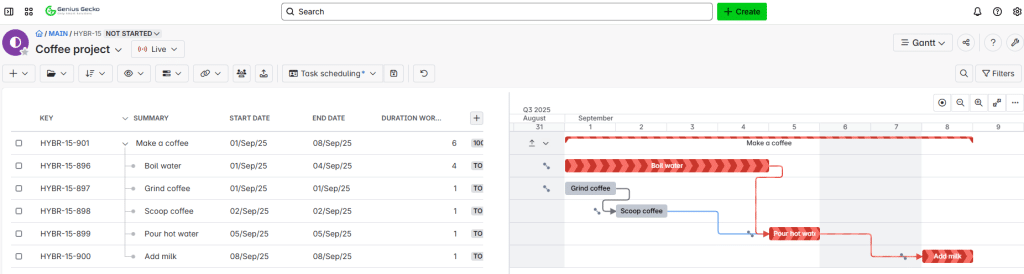
We also did an example in BigPicture. This is a perfect illustration of how project management software brings the theoretical Critical Path Method into the real world.
The tool correctly identified the critical path as the sequence of tasks: (A) Boil Water → (D) Pour Hot Water → (E) Add Milk. As you can tell this one is different than in the example above.

Here’s why:
When you set the task durations (e.g., assuming 1 minute = 2 days just to depict the example), you made the “Boil water” task significantly longer than the combined “Grind coffee” and “Scoop coffee” tasks.
Even though “Grind coffee” and “Scoop coffee” are in a sequential chain, their combined duration is far shorter than the “Boil water” task. As a result, the path they are on has a lot of float (slack).
The BigPicture tool correctly ignored the shorter, non-critical path and highlighted the longest path—the one that will actually determine your project’s completion time. The “Grind coffee” and “Scoop coffee” tasks can be delayed without impacting the final deadline, but any delay to “Boil water,” “Pour hot water,” or “Add milk” will immediately push back the project’s end date.
This is a key takeaway: Project management software like BigPicture doesn’t care about your assumptions or a simplified example. It calculates the critical path based on the actual task durations and dependencies you enter. It’s a powerful and accurate tool for identifying where you need to focus to ensure your project stays on schedule.
Conclusion: From Overwhelm to Clarity
The critical path isn’t just a fancy project management concept—it’s the lifeline of your project. It tells you which tasks truly matter, which ones have breathing room, and how to deliver on time, every time.
By following these simple steps, you can calculate it yourself for small projects. But in the real world of enterprise project management, tools like BigPicture make the process seamless.
The next time you’re staring down a mountain of tasks, don’t panic. Find your critical path. That’s your shortcut from chaos to clarity.
If you would like to get to know more details about Critical Path funcionality in BigPicture, check out our video on YouTube: