
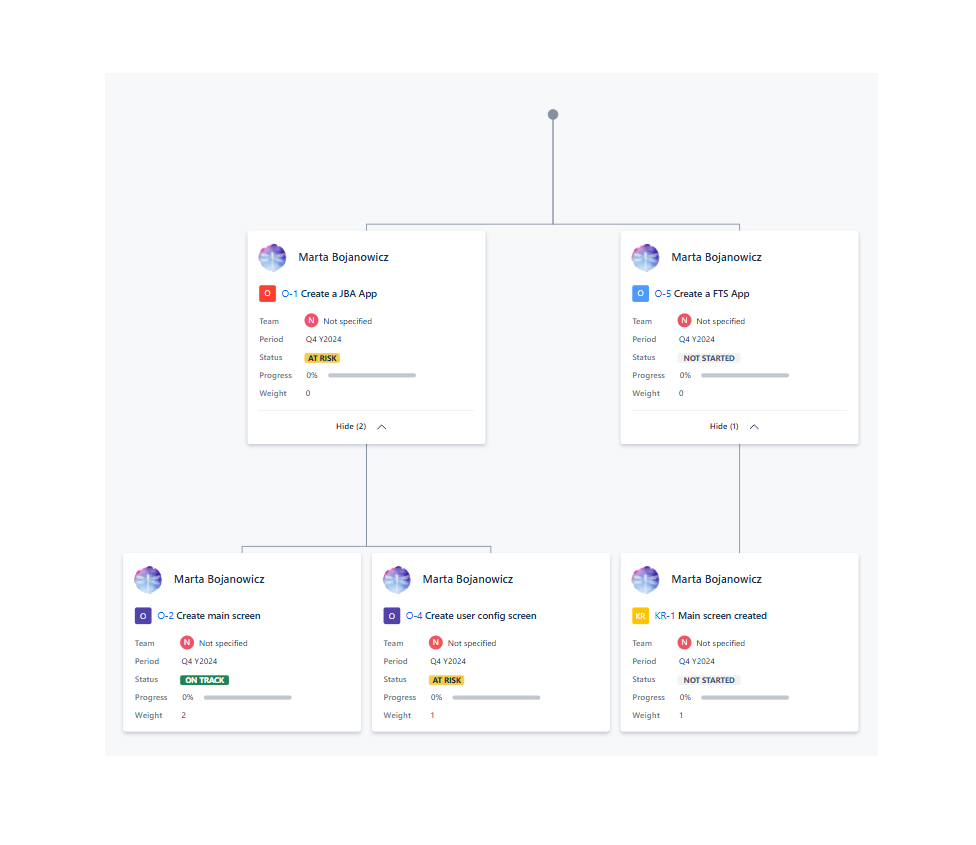
In today’s dynamic business environment, strategic alignment and measurable progress tracking are more essential than ever. The new OKRs module in BigPicture empowers organizations to translate high-level goals into actionable outcomes — keeping teams focused, motivated, and accountable. It was recently implemented as a release for BigPicture Enterprise users.
What Are OKRs?
OKRs (Objectives and Key Results) are a popular goal-setting framework designed to bring clarity and direction to teams and projects. An Objective defines what you want to achieve. Key Results define how you’ll measure success.

Example:
- Objective: Improve customer satisfaction
- Key Result 1: Increase NPS from 30 to 50
- Key Result 2: Reduce support ticket resolution time by 20%
- Key Result 1: Increase NPS from 30 to 50
Whereas traditional objectives might be vague or aspirational, OKRs demand precision. They are always measurable, typically reviewed quarterly, and tightly aligned to company strategy.
Discrepancies Across Methodologies
Here’s how Objectives and OKRs vary across different popular methodologies:
1. Agile (Scrum/SAFe/LeSS)
- Objectives: Often tied to PI (Program Increment) Objectives or team-level goals.
- OKRs: Used increasingly to align agile team outputs with business outcomes.
- In SAFe, there is a concept of “PI Objectives” which are similar to Objectives, but OKRs bring clarity and measurable tracking to them.
2. Management by Objectives (MBO)
- Focus is on setting broad objectives and tracking performance.
- OKRs evolved from MBO but are more transparent, faster-paced, and include clear success metrics.
3. Hoshin Kanri (Lean Strategy Deployment)
- Objectives are high-level strategic goals.
- Uses “catchball” process to cascade and refine objectives.
- OKRs can be used here to break down Hoshin objectives into actionable key results.
OKRs add rigor and clarity to these frameworks, making abstract objectives measurable and actionable.
Why Use OKRs in BigPicture?
BigPicture integrates OKRs directly into your agile and strategic planning workflows, allowing you to align your goals with the actual work being done. Here’s what makes the new OKR module stand out:
Seamless Integration Across Levels
You can create and manage OKRs at any box level—from individual projects to programs and portfolios. Whether you’re setting strategic goals for the entire organization or operational objectives for specific teams, BigPicture ensures visibility and alignment across all layers.
Hierarchical Structure: Objectives, Sub-objectives, and Key Results
Within BogPicture Enterprise you can now build a structured OKR tree with:
- Objectives
- Sub-objectives
- Key Results

This hierarchical approach promotes clarity and cascading goals, ensuring everyone knows how their work contributes to larger outcomes.

Automatic & Manual Tracking
BigPicture supports both automatic and manual updates for Key Results:
- Auto-KRs: Progress updates automatically based on linked issue status.
- Manual KRs: Updated manually through the user interface.

Progress can be visualized in real-time via Gantt modules, columns, and the Progress Dashboard, where you can easily spot which Objectives are “On track,” “At risk,” or “Off track.”
New Options and Views
- Objectives and Key Results Columns: Add these to any view (e.g., Gantt) for instant OKR visibility.

- Progress Dashboard: Monitor Objective health and status centrally.
- Celebrate success: The module also makes it easy to celebrate success. It clearly shows you which objectives moved to or stayed in On track mode.

- Grouping Features: Group tasks by Objectives or KRs for cleaner visual organization.

- Task Structure Builder: Design your own structures around OKRs for even more control.

Permissions & Security
You can restrict who can edit OKRs, ensuring that high-level strategic goals remain secure and tamper-proof.Sometimes OKRs are set at a higher level within the organization and cascaded to teams. What is great about BP is that you can also restrict your OKRs to prevent other app users from making any changes to them. More info under Appfire’s documentation related to restrictions.
Powerful Filtering and Views
Use advanced filters and saved views to zero in on specific OKRs, team contributions, or performance gaps. The OKR module provides a rich set of filters for efficient searching and reporting.

Tips for Success
Need help setting great OKRs? You can always ask us to help you with proper BigPicture setup however BigPicture also offers helpful tips within the tool – Tips and tricks are there directly always available for you!

Also you can check out Appfire’s blog on agile goal-setting to set OKRs like a pro.
In Summary
Objectives = What you want to achieve
OKRs = What + how you’ll know you achieved it
BigPicture’s OKR module is not just a feature — it’s a strategic bridge between vision and execution. With measurable tracking, flexible configuration, and real-time visibility, it empowers your teams to stay aligned, focused, and successful.
Sounds interesting? Start turning your goals into results today!